Repository navigation
Git: Support editing the commit message in a text editor #30562
Description
Activity
You expect to edit the commit message in a full blown text editor?
Reacted by Caleb Meyer, matt morris, Mikey Battiston, chell sz, Ezra Buehler, Yukai Huang and Paul PriceIndeed. That's been my workflow for many years. I find it invaluable to see all my changes in one place as I try describe what I changed. It also makes it easy for me to spot any stray
debuggerstatements and the like before I finalize the commit.Reacted by Wesley Hansen, Timur Kasiev, Pau Fernández, Thai Pangsakulyanont, Erik Aybar, Brandon Pugh, Alan Falloon, Dror Atariah, Václav Brožík, Bellarmine Head and 39 moreI'll repost my comment from #2718 (comment) where I asked for some specific features for the Git commit message editor (whether it's in a full editor window or not, though being in a full editor window would probably make it easier to implement this request):
... [T]he rule for Git commit message word wrapping should be very simple:
- First line warns if it's more than 50 columns. (This is the current behavior).
- Second line warns if it isn't blank.
- Rest of the commit wraps on spaces (or on any whitespace, but I recommend sticking with plain 0x20 space characters only for simplicity) at a user-configurable column, defaulting to 72 since that's the current standard recommended by Git.
- Any line in the commit that does NOT contain spaces does not wrap, but a warning pops up (similar to the warning if the first line is > 50 columns) saying "Your commit message contains # long line(s) which could not be wrapped because they do not contain spaces. If these lines are URLs, that's probably okay, but otherwise you should consider adding spaces so that the lines can be wrapped. Your settings are currently set to wrap any lines longer than 72 characters in your commit message." (With #, of course, being substituted for the actual number of too-long lines in the message.)
- That warning can be disabled in the user or workspace config settings, for the sake of any teams who have standardized on languages like Thai which do not use spaces in the language. The word-wrapping behavior can also be completely disabled if the user so desires, but it starts configured to be ON.
- (Optional). If the long line starts with the regex [a-zA-Z][-a-zA-Z+.]+: (see RFC 3986), it is assumed to be a URL and no warning is issued for that line, since it's usually not desirable to split a URL across two or more lines.
This would go a long way towards making VS Code's Git message editor usable. As of right now, I avoid using VS Code's Git integration because it doesn't format Git messages correctly according to the coding standards of just about every project I've worked on. So despite the fact that VS Code has pretty good Git integration for most things, I still just Alt-Tab to a terminal and write my Git commits in Vim, where I can set it up to do the right thing for commit messages (wrap at 72 columns, or at 70 for one project I work on that has slightly stricter rules than most).
Reacted by Jason, matt morris, Joe Lencioni, Waylan Limberg, Alan Falloon, Nick Cappadona, Václav Brožík, Bellarmine Head, Chris Belyea, Hannah Witvrouwen and 13 moreRobin Munn (@rmunn) I'm not sure about bringing the issue of automatic wrapping up again in here in this issue that isn't really about it, though I see that you may have commented here because I'd closed #2718, which I've now re-opened.
Something I've learned from writing stkb/Rewrap is that wrapping isn't as simple as you'd first think and people have all sorts of requirements (ok, like just about every project then).
My workflow currently is to go the source control pane and look through the file diffs, then if it's a short commit message just type it in the box there, but it it's longer run
git commitfrom the built-in terminal, which brings up a new vscode window where I have rulers set up at 50 and 72 columns and can use Rewrap to wrap the contents and check how it looks before committing.So I don't see the need to use Vim, you can set up vscode as your git editor and for me it works fine. It would be nice if there was a faster way to switch to a full editor for the commit message, but I'd only put it in the "nice to have" category rather than essential.
Any news on whether this will be implemented? I really like VSCode's Git workflow but I like the commit message style from Atom. I think this could be implemented as an option on commit so that, instead of showing the one-liner text box, it shows a fully fleshed editor (ideally as a split panel) using
git commit --verbose. One of the advantages is that all rulers and autocomplete extensions that you add to the editor would be available.Currently I'm using the run-in-terminal extension with a shortcut tied to a custom script that reproduces the behaviour of VSCode's commit. It works but not always quickly and seems like an overkill.
- changed the title
[-]Add support for git commit verbose[/-][+]Git: Support editing the commit message in a text editor[/+]on Sep 18, 2018 Would love to see this feature implemented.
Reacted by Chad Nickell, statiolake, Timur Kasiev, Markus Weimer, Titouan CREACH, Pau Fernández, Damon Jablons, Brandon Thompson, Thai Pangsakulyanont, Shadab Zafar and 39 moreCurrently I'm using the run-in-terminal extension with a shortcut tied to a custom script that reproduces the behaviour of VSCode's commit. It works but not always quickly and seems like an overkill.
José Sánchez-Gallego (@albireox) would you mind sharing the implementation of that script? Do you do something other than shelling out to
git commit --verbose, and havecodeset as your default Git editor?40 remaining items
Today's Insiders release (2022-06-10) contains the changes to use the editor for the git commit input. You can enable this capability using the
git.useEditorAsCommitInput. After enabling the setting you will have to restart VS Code so that theGIT_EDITORenvironment variable is set. Give it a try and let me know if you run into any issues.Thanks again to Jonas Dellinger (@JohnnyCrazy) for his contribution as well as to all of you for your patience.
Reacted by Jonas Dellinger, Jon Haddow, José Sánchez-Gallego, Marcus R. Brown, EdnaSmartFactory and KristianStarting with today's Insiders release (2022-06-17) we have made two changes:
git.useEditorAsCommitInputis now enabled by default- Added a new setting,
git.terminalGitEditor, so that users can opt out when runninggit commitcommands in the integrated terminal
Reacted by Jonas Dellinger, Mazen — sa/acc and Alexey PalazhchenkoReacted by happytequeReacted by Mazen — sa/acc and Lucas BrandstätterReacted by Marcus R. Brown and Mazen — sa/accGosh here we go again... why are you people so obsessed with constantly changing defaults settings?? I have had vim for years and suddenly something changes and I have just wasted half an hour of my time trying to work out what to change to bring it back as it has been for years.
Pro TIP: unless you are fixing something that was breaking DON'T. CHANGE. DEFAULT. SETTINGS.
Thanks
Reacted by 1Mark, Alexey Palazhchenko, Ionuț Botizan, José Sánchez-Gallego, Lucas Brandstätter, Akito, Lorenzo Delmonte and Lucy Davinhart || Strawb SystemAdditionally it's not synced, so now I have to manually go and change it on every machine I use... 🙄 ...
Reacted by 1Mark, Lucas Brandstätter and Lucy Davinhart || Strawb SystemI'll just lueae this here:
Reacted by chell sz, 1Mark, Alexey Palazhchenko, Ionuț Botizan, José Sánchez-Gallego, Akito and Lorenzo DelmonteReacted by happytequeIf Vim is "horrifying" to you, I suggest a career switch to organic farming. What an arrogant smartarse
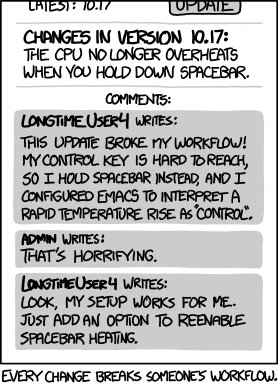
Every change breaks someone's workflow, which is why you should keep to a minimum unless you are solving a real problem. You weren't.
Reacted by 1Mark, Alexey Palazhchenko, Ionuț Botizan, José Sánchez-Gallego, Lucas Brandstätter, Akito, Lucy Davinhart || Strawb System and Segev FinerPro TIP: unless you are fixing something that was breaking DON'T. CHANGE. DEFAULT. SETTINGS.
Maybe it isn't broken for you, but it is for users who are not comfortable with vim. Furthermore, being able to act as the default editor for git commit messages, we are now in the fortunate position to be able to provide additional value (think issue completion, author completion, semantic versioning linting, etc.).
Additionally it's not synced, so now I have to manually go and change it on every machine I use... 🙄
Feel free to enable Settings Sync.
happyteque One more thing: please think twice about arbitrarily offending people online. Just because there's hardware between you and another person, doesn't mean you can be impolite.
Reacted by Alexey Palazhchenko, Lucas Brandstätter, Ladislau Szomoru, Akito and 1MarkMore xkcd
I understand why some people may like it, I am only objecting to the defaults changing for everyone, João Moreno (@joaomoreno).
Git itself handled such changes better - when they enforced merge strategies, they started showing a message on every merge telling people they now had a new option and had to make a choice. The message also told them what their options were. Whereas you guys just changed one of the settings without warning nor explanations. It's not the first time you do this, I still remember the train wreck whith the Terminal panels suddenly not being movable to the right anymore.As for Segev Finer (@segevfiner), he was the one out of line with his sarcastic, snappy reply. Perhaps you should have words with him, but I understand it's easier to gang up on ${WEIRD_STRANGER}.
Reacted by Lucy Davinhart || Strawb System, 1Mark and Segev FinerIf Vim is "horrifying" to you, I suggest a career switch to organic farming. What an arrogant smartarse
Thank you for appropriately assessing your own behaviour. This way, nobody has to tell you, how you sound.
Every change breaks someone's workflow, which is why you should keep to a minimum unless you are solving a real problem. You weren't.
Obviously, there was a real issue, hence this issue. Additionally, if you are heating up your spacebar for years and think that's alright, then that does not mean nobody should break that behaviour. If you are doing it wrong for years, it's time, since years, to change your wrong behaviour.
All that you said in this issue is basically just a psychological defense mechanism, which automatically kicked and has only the purpose of making you look less like an arrogant dumbass. You are not being honest. You are not trying to find the truth or debate honestly about what is better. You just childishly came here -- initially caused by your wrongful assumption, that nothing will ever change and everything will ever stay the same with software, which evolves on a monthly basis -- and try to fart your fault out of your arse onto others, because you got used to heating up your spacebar for pressing the control button.
If you are not being able to adjust to improvements in your software tools, you should probably switch to a job, which is already fully optimised. However, do not switch to any type of farming, because there you would need to constantly adjust to new methods and technical possibilities, too. They use pretty high-tech machines there, nowadays.
I am only objecting to the defaults changing for everyone
The same criticism you already read applies the same way to defaults. If a default is crap, it should be changed. Simple as that. Just because you are still stuck in the terminal in this specific situation, that does not mean everyone is and wants to be.
Whereas you guys just changed one of the settings without warning nor explanations. It's not the first time you do this, I still remember the train wreck whith the Terminal panels suddenly not being movable to the right anymore.
Actually, I have experienced the same. Do you know what I do then? I read the most recent changelog, perhaps even CTRL+F for a keyword and there is my result. All clear now. Takes like two minutes in total.
he was the one out of line with his sarcastic, snappy reply.
It wasn't sarcastic, though. You do the same as the guy heating up his spacebar. It's literally a description of what you were complaining about.
I understand it's easier to gang up on ${WEIRD_STRANGER}.
Again, one of those psychologically caused fallacies for mindlessly defending oneself.
In case it makes you happier:I am just another VS Code user who followed this issue for such a long time. Was waiting for a fix, as many others did. Now you came here with your smartarse attitude and made it seem like this was a bad change, just because you want to keep heating up your spacebar. So, I thought, I am going to tell you what's going on, because you are being simply unfair and absolutely dishonest.
QED
I am sure everyone's really interested in reading Akito (@theAkito)'s vitriolic tome and their personal attacks. João Moreno (@joaomoreno) will no doubt scold me for it. It's probably time to lock this issue - I can only repeat the invitation to being more careful with handling default settings changes. As for the deranged comment above, I cannot help but note that Akito (@theAkito)'s mission statement is "Free yourself from yourself". I can see why they'd write that.
Reacted by Lucy Davinhart || Strawb System and 1MarkAlright that's it, locking this down. Thanks for making everyone's day a little bit worse, happyteque. I really hope you got something out of it, because nobody else did.
- locked as too heated and limited conversation to collaborators
on Jun 27, 2022
When I make a commit, I enjoy writing the commit message in an editor window containing a complete diff of my staged changes. I can do that from the terminal by running the command:
However, VSCode doesn't seem to support that commit mode out of the box. Perhaps it could be the fallback behavior if you run one of the
Git: Commitcommands and enter a blank commit message. (Currently, that fails silently.) Or better yet, how about agit.verboseCommitsetting that, set totrue, would make theGit: Commitcommands take me directly to the verbose commit editor?